
Schedule Once,
Post Everywhere
Post to all your socials with one tool
Generate content ideas, plan your posts, and schedule them with one tool across TikTok, Instagram, Facebook, and YouTube without burning out.



Schedule to All Your Social Platforms
Upload your content once and schedule it to go live across TikTok, Instagram, Facebook, and YouTube. No app-switching required.
- TikTok Videos
- Instagram Posts, Reels & Stories
- Facebook Posts & Reels
- YouTube Shorts
How It Works?
Think of CRESQA as your creative partner: it connects your platforms, generates ideas, and posts for you, so you can spend more time making, not managing.
Create Your Profile
Tell CRESQA what your brand or project is about and who your audience is.
Connect Platforms
Link your TikTok, Instagram, Facebook, and YouTube accounts in a few clicks.
Generate Ideas
Let AI brainstorm scroll-stopping content ideas tailored to your brand.
Schedule & Post
Pick a date, hit schedule, and CRESQA posts it for you automatically.

“ I just banged out a month's worth of content during a single cup of coffee. “

“ Okay, CRESQA is pretty amazing! You've really created something incredible here! “
Supported Platforms
Post everywhere your audience hangs out. CRESQA connects to the biggest social platforms so you can schedule and publish from one place.
TikTok
YouTube
Combat Writer's Block with CRESQA Ideas
Generate personalized post ideas in seconds based on your brand, audience, current trends, and selected vibe.
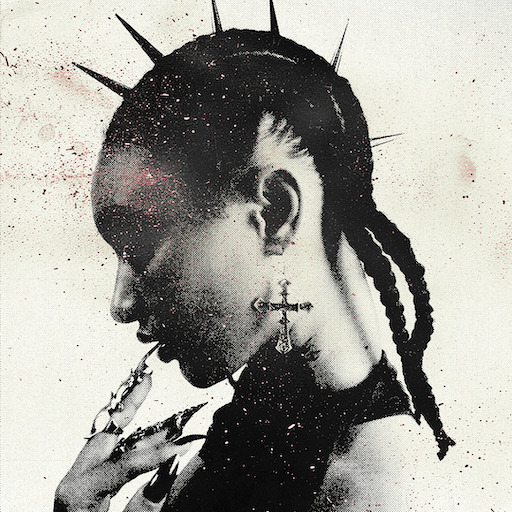
Glitch Pixie
Genre
Hyperpop
Location
Berlin, Germany
Vibes
Whimsical, Edgy
ABOLITION COALITION
Genre
Alt Rock
Location
Seattle, USA
Vibes
Funny, Adventurous
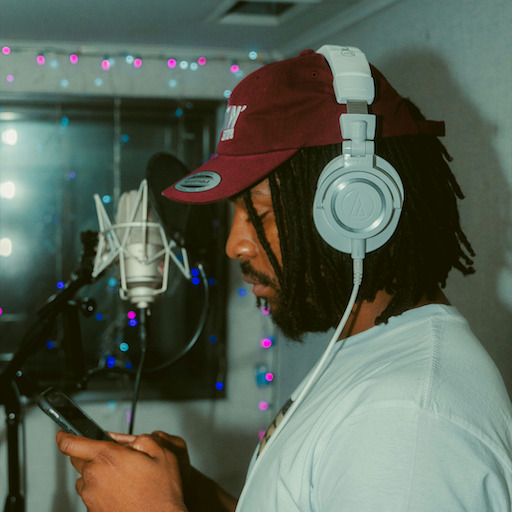
Ghostflow
Genre
Hip-Hop
Location
London, UK
Vibes
Inspirational, Edgy
Neon Nightmares
A synth-heavy track with a beat reminiscent of Grimes. The creation involved using vintage analog synths and custom software patches that I will sell on my website. The song is about feelings of anxiety.
Asymmetrical bracelet
Bracelets that I make myself from recycled silver - each of these is unique due to the DIY process. I want to promote them as a sustainable alternative to store-bought jewelry.
Waves Vienna
I am playing at Loft Main Floor at 20:15PM and my stage setup is going to be very interesting - I'll have a projector that beams live visualisations of the sound that I'm playing, a bit like the iconic windows media player animations.
Basement Gigs
The song is about the indie scene itself, specifically playing shows in cramped, sweaty venues. We recorded some of the crowd noise from one of our basement gigs and added it to the song.
Urban Legends T-Shirt
A limited edition t-shirt featuring the band’s logo and a quirky design inspired by the song. The band wants to promote it as a collectible item for fans.
Permanent Adolescence Festival
Our first time playing in Portland and also first time at a festival ever.
Brick by Brick
The song tells the story of building something meaningful from the ground up, piece by piece. Referencing Ghostflow's journey from Smethwick to London, the track highlights the struggles of staying grounded while constantly evolving.
Ghostflow Hoodie
All-black hoodie with Ghostflow's logo in the front. The sleeves say "Concrete Flowers" tying in with the title of his album.
Concrete Flowers Tour
Ghostflow's first headline tour across the UK, featuring tracks from his debut album 'Concrete Flowers'.
🔮 POV: You’re in a cyberpunk dreamscape

Idea:
Create a montage of neon-lit Berlin streets and Glitch Pixie performing 'Neon Nightmares'. Use quick cuts to mimic a trippy dream sequence.
Tip: Prompt viewers to share their own 'cyberpunk' city clips using the song.
🎛️ Behind the Scenes: Synth Heaven

Idea:
Capture a close-up shot of the vintage analog synths used in creating 'Neon Nightmares'.
Tip: Use neon lighting for a futuristic look. In the caption, ask fans which synth sound stands out to them.
🔮 Neon Nightmares Lyric Quiz

Idea:
Create a series of questions about the track's lyrics.
Tip: Use interactive quiz stickers, and reward correct answers with a custom patch giveaway.
🛠️ DIY vs. Store-Bought: Which bracelet wins?
Idea:
Compare a DIY asymmetrical bracelet to a store-bought one and explain why DIY wins.
Tip: Encourage comments on which bracelet style they prefer and why.
🛠️ Crafting the Asymmetrical Bracelet
Idea:
Photo of Glitch Pixie creating bracelets in a messy, artistic studio. Silver pieces, tools, and unfinished bracelets scattered around.
Tip: Caption with 'Each piece is a labor of love and creativity. Which tool do you think I use the most?' to prompt comments
🔮 DIY Bracelet Preview
Idea:
Showcase creating the asymmetrical bracelets at home, highlighting unique designs
Tip: Use close-up shots of your hands crafting the bracelet. Add a poll: 'Which design do you love most?'
🎵 Have you seen a gig like this before?
Idea:
Share a sneak peek of your projector setup with live visuals. Explain how it transforms your performance into a unique experience.
Tip: Invite followers to guess what visuals represent the song.
🌌 Celestial Concert Countdown
Idea:
A photo of a starry night sky with concert details overlaid in a whimsical font.
Tip: Include a countdown timer in your story, ask followers to share their favorite concert memory.
🔮 Guess the Setlist Quiz
Idea:
Post snippets of songs and challenge fans to guess the setlist.
Tip: Use the quiz feature, and add a playful caption about surprises awaiting in Vienna.
🎸 When the crowd noise is actually from a gig
Idea:
Talk about how you recorded real crowd noise from a basement gig, making the song super authentic.
Tip: Encourage followers to share their basement gig stories in comments.
🎤 Behind-the-Scenes Snaps
Idea:
Share a behind-the-scenes photo from the recording session with crowd noise.
Tip: Use a gritty, unpolished filter. Encourage fans to share their favorite live concert moments.
🤘 Seattle Gig Memories Poll
Idea:
Post past gig pics and ask fans to vote on their favorite memory or venue.
Tip: Use poll stickers for engagement. Caption: 'Which gig was the wildest? Vote now!' #SeattleSound
🎸 A jam session in our new Urban Legends tee!
Idea:
Play a short, unreleased riff while wearing the t-shirt. Ask followers to guess the song's theme in the comments, sparking interaction.
Tip: Add quirky on-screen text inviting viewers to 'Join the Jam'.
👕 Band T-shirt on Iconic Seattle Street
Idea:
Capture the band wearing the Urban Legends T-Shirt in front of the Pike Place Market.
Tip: Encourage fans to share their Seattle T-shirt photos to win exclusive band merch.
🎨 Design Inspiration for Our Urban Legends Tee
Idea:
Sneak peek! Here's the quirky design process behind our new tee. You might spot an Urban Legend or two!
Tip: Share sketches or digital designs with a 'Guess the Legend' quiz sticker.
🎸 Our first festival: here's how we're prepping!
Idea:
Capture band rehearsals and funny moments while preparing for the Permanent Adolescence Festival. Add cuts of you hyping up the event.
Tip: Invite fans to comment their festival must-haves or tips.
🌲 Road Trip to Portland
Idea:
Shot of the band packed in a van with instruments, heading to Portland. Capture the excitement and adventure vibe.
Tip: Caption could ask fans for Portland tips or favorite songs to play on the road.
⏰ Countdown to Permanent Adolescence
Idea:
Create a countdown for the festival day. Share excitement with personal notes about what Portland means to them.
Tip: Use countdown sticker and encourage followers to set reminders.
🧱 Building dreams, one brick at a time
Idea:
Show a time-lapse of you creating something meaningful, brick by brick, while your song plays in the background.
Tip: Ask viewers to comment on their personal 'brick by brick' stories.
🎤 Street Performance Vibes
Idea:
Photo of Ghostflow performing on a busy London street.
Tip: Encourage followers to share their favorite street art or performance location in the comments.
📍 London Landmarks Story Quiz
Idea:
Post pics from key places in London that inspired 'Brick by Brick'. Ask followers to guess the location with a quiz sticker.
Tip: Include locations like Smethwick and Central London. Use the location sticker for each place.
🌸 Here's how I style my Ghostflow hoodie
Idea:
Showcase various outfits centered around the Ghostflow hoodie, blending streetwear with activism vibes, emphasizing its versatility.
Tip: Encourage followers to share their own styling tips in the comments.
🌇 Urban Jungle Hoodie Close-up
Idea:
Capture a close-up of the hoodie sleeve with 'Concrete Flowers' graffiti in a London alley
Tip: Use a vibrant urban setting in London for authenticity. Engage by asking followers where they'd wear it
🖤 Cozy Day with Ghostflow Hoodie
Idea:
Show Ghostflow at home, chilling in the hoodie, sipping tea. Add a poll: 'Who's joining the chill vibes?'
Tip: Use a cozy, relaxed setting. Caption: 'Sunday mood or everyday mood?' Add a tea emoji ☕ for extra warmth.
🌸 Behind the Scenes of Concrete Flowers Tour
Idea:
Sneak peeks of tour prep, rehearsals, and exclusive backstage moments.
Tip: Encourage fans to comment on what they hope to see on tour.
🌆 London Skyline with Concert Date
Idea:
Photo of Ghostflow overlooking London's skyline with the concert date written creatively in the sky.
Tip: Include a caption inviting fans to share their favorite London memory in the comments.
📅 Countdown to Concrete Flowers Tour
Idea:
Use a countdown sticker for the tour date. Share anticipation and excitement for the first headline tour.
Tip: Add a call to action like 'Set your reminder!' to boost engagement.
CRESQA Features You'll Love
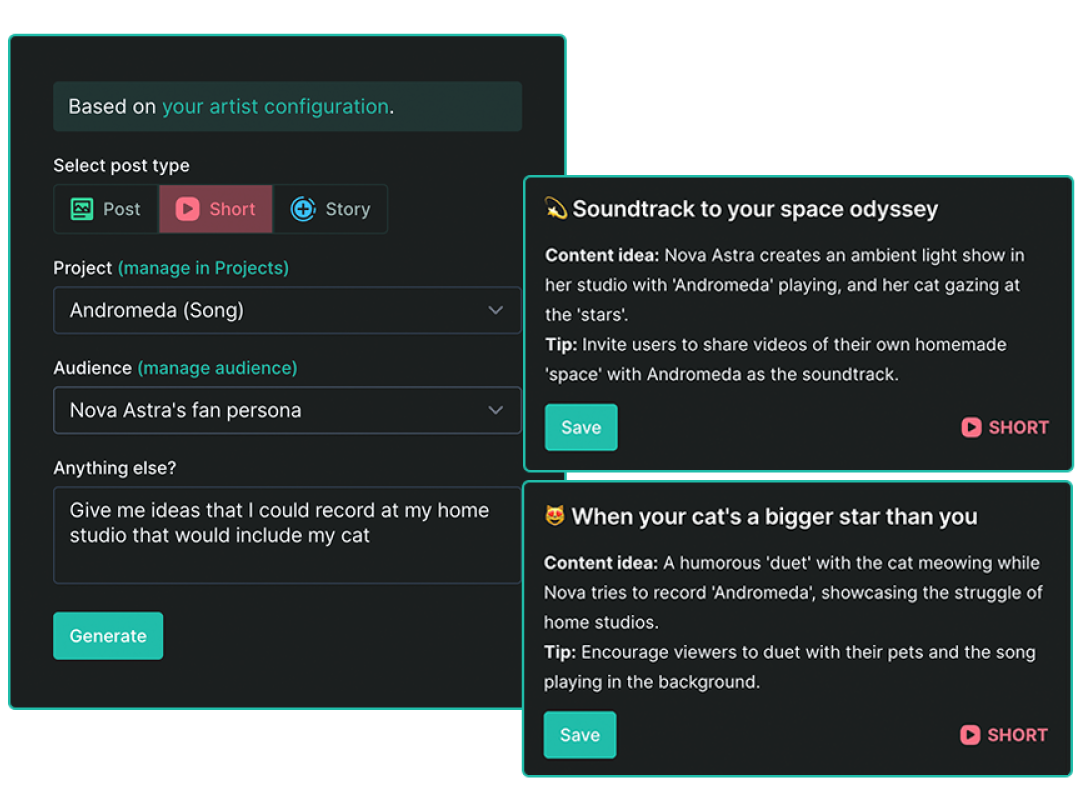
AI Idea Generator
Content ideas tailored to your voice, your vibe, and your audience. Skip the blank page—CRESQA uses AI to generate content prompts that match your style, goals, and tone of voice.
Your ideas are based on:
- Your brand or project
- Your audience and goals
- Trending topics
- Selected vibe or content theme
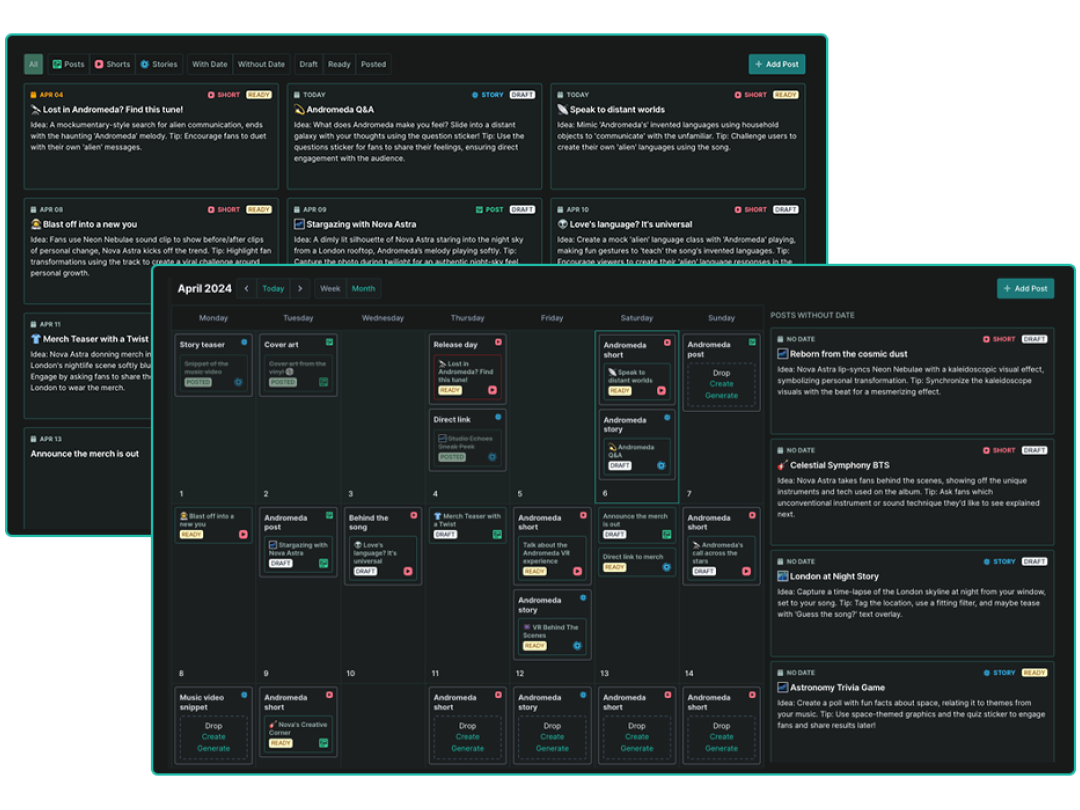
Visual Content Calendar
Drag. Drop. Done. Plan your content at a glance with our intuitive calendar. Rearrange posts by dragging them, brainstorm ideas in the sketchpad, and switch between week and month views to stay in control.
- Visual calendar with week/month views
- Built-in sketchpad for messy brainstorming
- Easy rescheduling via drag and drops
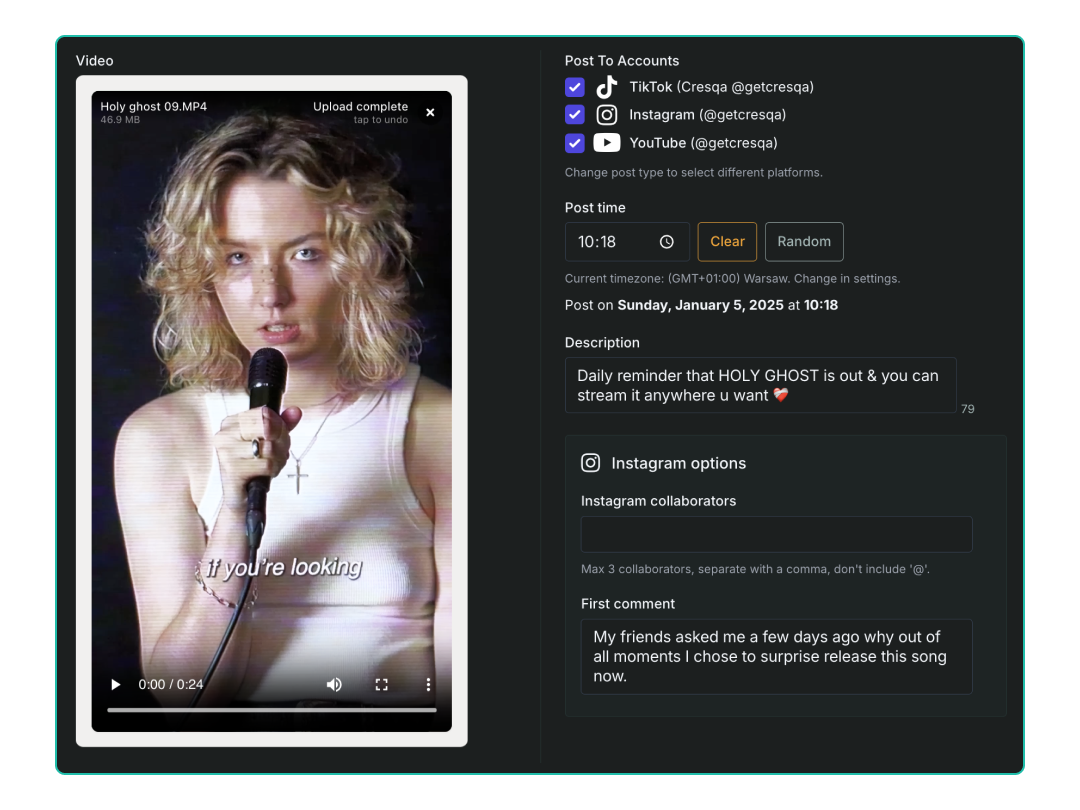
Automatic Posting
Set it and forget it. CRESQA posts for you. Once your content is ready, schedule it to go live across all major platforms. No app-switching required.
Supported formats:
- Instagram Posts, Reels, and Stories
- TikTok Videos
- YouTube Shorts

“ CRESQA’s ideas had inspired me to create more content which indeed got really good results. You're never gonna run out of content ideas when CRESQA has got your back. “
“ Amazing AI tool that helps you generate creative content ideas tailored to your brand and audience (and much, much more!) I was among the first to test it out and absolutely loved it! “
Spend less time planning, more time creating
Let CRESQA learn about you, your projects, and your target audience. Generate AI post ideas, plan your content, and let CRESQA post it for you.
- AI Idea Generator
- Content Calendar
- Post Scheduling
Frequently Asked Questions
CRESQA is an AI-powered social media scheduling tool that helps creators and businesses plan, schedule, and automatically post content across multiple platforms from one place. It features:
- Automatic Posting to TikTok, Instagram, Facebook, and YouTube on the dates and times you choose.
- Visual Content Calendar for planning and organizing your posts with drag-and-drop scheduling.
- AI Idea Generator that suggests content ideas based on your brand, audience, current trends, and selected vibe.
CRESQA supports automatic posting to Instagram (posts, reels, and stories), TikTok (videos), Facebook (posts and reels), and YouTube Shorts. The AI Idea Generator works for any platform, the content ideas it creates can be adapted to wherever your audience is.
Yes! CRESQA lets you schedule and automatically post your photos and videos to Instagram (posts, reels, stories), TikTok (videos), Facebook (posts and reels), and YouTube Shorts. Just pick a date and time, upload your content, add your caption and any extra details like Instagram collaborators or a first comment, and CRESQA handles the rest.
CRESQA is for anyone who needs to post consistently but doesn't have time to manage it all manually. That includes artists and musicians, content creators, coaches and freelancers, retail and e-commerce businesses, SaaS companies, event organizers, and media publishers. Whether you're a solo creator or a growing brand, CRESQA helps you plan content, generate ideas, and schedule posts across all your platforms from one place.
No, CRESQA doesn't have a mobile app yet, but we're always open to feedback and suggestions. For now, CRESQA works seamlessly in your mobile web browser. iPhone users seeking quicker access can easily add CRESQA as a website icon to their Home Screen. Here’s how:
- Open CRESQA in Safari and tap the Share button.
- Scroll down and select "Add to Home Screen."
- If "Add to Home Screen" isn't visible, tap "Edit Actions" at the bottom, then add it.
- The icon will then appear on your device for quick access to CRESQA.

“ As a music professional and an artist, I see massive potential in CRESQA. It provides insights I would never have thought of, and it allows me to manage my social media more seamlessly. “
Spend less time planning, more time creating
Let CRESQA learn about you, your projects, and your target audience. Generate AI post ideas, plan your content, and let CRESQA post it for you.
- AI Idea Generator
- Content Calendar
- Post Scheduling